We’re proud to announce that Facetious, a plugin we’ve been working on for quite some time, has now been released in the official WordPress repository. And we’d like to thank the UK taxpayer for his/her assistance in writing it.
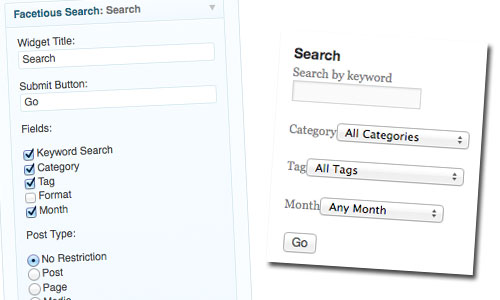
We do a lot of work for government departments, and on several recent projects, there’s been a requirement for an ‘advanced’ or ‘faceted’ search form. This allows you to search by post type, by keyword, by taxonomy, and by month – all together. You can see it on the Government Olympic Communication site, for example, where we let you search its video library (post type) by keyword, and/or theme, department, nation/region, video quality, or month of upload.
We did something similar for the Commission on Devolution in Wales; and it’s a key feature of another site due to go live in the next month or so.
We’re in good company, by the way: you’ll see a very similar search form on GovUK’s Inside Government pages, for example.
It became immediately obvious that we could write the code as a plugin, for instant reuse on any WordPress site. We called it Facetious, because it had the word ‘facet’ in it. And in keeping with our open source principles – not to mention the fact that the development work had been funded by government departments – we decided we would release it publicly in the official WordPress plugin repository.
Out of the box, it provides an enhanced ‘search form’ widget, which you can drop into any WordPress sidebar. If you want to add a customised form into your own post templates, we’ve made that easy too: it’s all detailed in the plugin’s readme file.
Facetious isn’t a ‘search engine’ per se: it’s just a simple way to construct complex multi-dimensional queries. The results are gathered using WordPress’s built-in search function, which doesn’t try to be anything too clever. If you’re looking for smarter search results, you’ll need a different plugin. (Maybe Relevanssi or something.)
Oh, there’s one more thing.
Search URLs in WordPress are the platform’s last unpretty ‘permalink’. Nobody wants to see ?s=keyword in their address bar; and it isn’t possible to cache query-string URLs using something like WP Super Cache. So we’ve created a new permalink structure for searches as part of Facetious, and your search URL now looks like /search/keyword/ – or /search/month/201302/keyword/whatever/category/uncategorized/. This will be applied to any search: not just those submitted via a Facetious form.
If you want to give it a try on your own WordPress site, just go to Plugins in the admin area, and search for it. If you’re a developer, and you’d like to help us improve Facetious, it’s also on Github. Pull requests welcome. 😉
My thanks to Nick H, Nick S and Sara P for letting us experiment on their sites over the past few months: and to John Blackbourn, for doing such a fantastic job turning my hacky code into a plugin to be proud of.