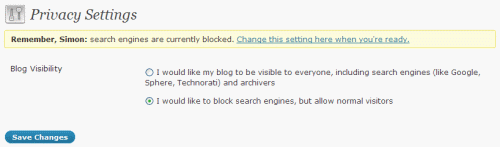
I’m sure we’ve all done it. You’re creating a new WordPress installation, and for a bit of privacy whilst you build the thing, you choose not to ‘allow my blog to appear in search engines like Google and Technorati’. But in the rush to get the site out the door, you forget to switch the setting to make it ‘visible to everyone, including search engines’.
So I’ve created a laughably simple WordPress plugin called ‘Robots.txt Reminder’, which adds a notification message to the top of all Admin pages if it detects that (a) your blog is set to block search engines, and (b) your user capabilities allow you to make the change. It’s kinda hard to ignore, but that’s kinda the point.
Click here to download robotreminder.zip, then – assuming you’re using one of the more recent versions of WordPress, and are able to do automated updating – upload the zip file as-is, by clicking on Plugins -> Add New -> Upload.
It’s not the first plugin I’ve ever coded, but it’s the first plugin I’ve ever ‘released’ like this, so please be gentle. 🙂
Responses
thank you for sharing a nice piece of functionality!
When a blog I work on had to be reinstalled, none of us realised this setting had to be changed. Two weeks later, when traffic had plunged and we’d stopped showing up in Google, we still couldn’t work out what was wrong.
I’m embarrassed to admit it, but we overlooked the simple solution and started talking about more complex things. Had we been blacklisted? Was it a Google conspiracy?
Er, no, as it turns out. Eventually someone found the setting, and all was good again.
It is easily done. So good work!
[…] In: WordPress plugins 26 Aug 2009 Go to Source […]
What a clever idea. Hope this becomes core WP functionality soon.
The killer is that even if you create a robots.txt file, the auto-headers WP generates if you forget to change that setting overrule them. I spent quite a while time looking at my nice robots.txt and not seeing my site in Google before I realised. And it’s happened 3 times since…
Made me smile as I’ve forgotten to turn this on when launching sites *so* many times!
While you’re at it can you make it give a reminder that the Google XML Sitemaps plugin is also not installed?
I am new to internet world and recently set up a blog. Google was not showing up this website of mine lately. After so much struggle, I landed at this site and I have now changed the privacy settings. Lol..
Thanks in advance. I just hope that my site gets indexed NOW!